From 20% Lost Freight Quotes to 90% Handled
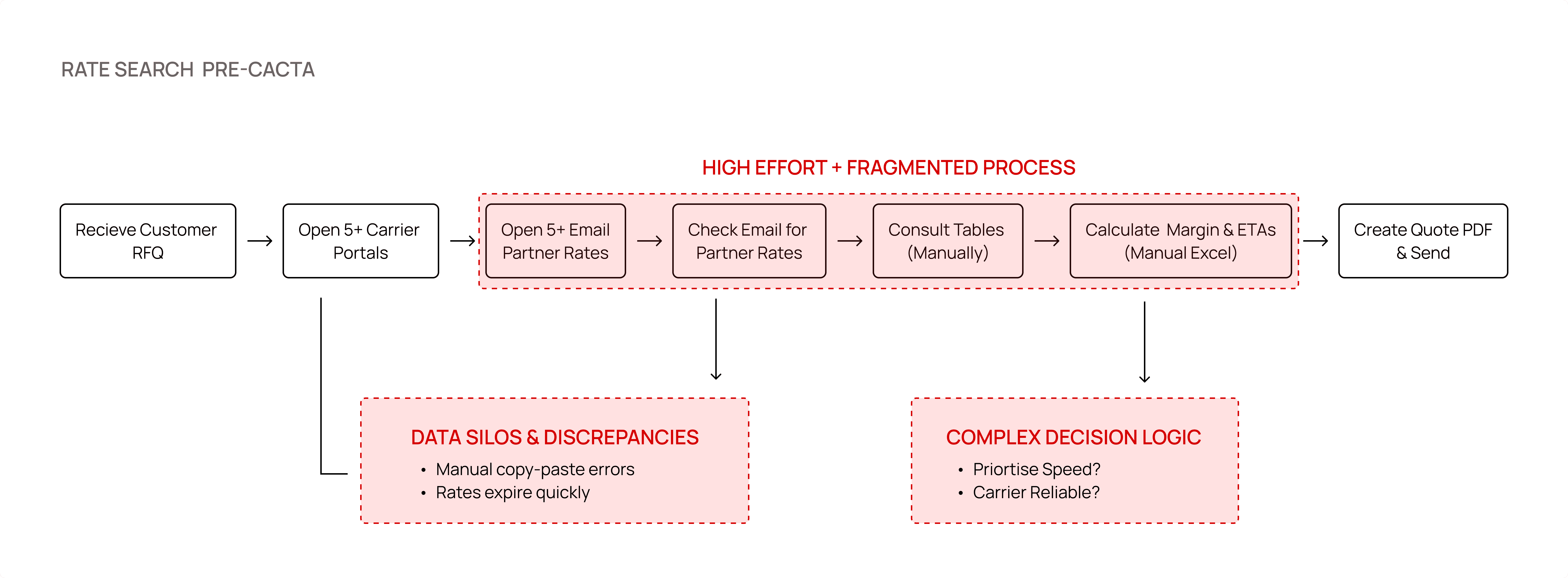
Cacta is an AI‑powered sales intelligence platform for freight forwarders, where it typically takes 30+ minutes to build a quote and 4+ hours to respond, and 20% of quote requests go unanswered due to scattered rate sheets and manual workflows.


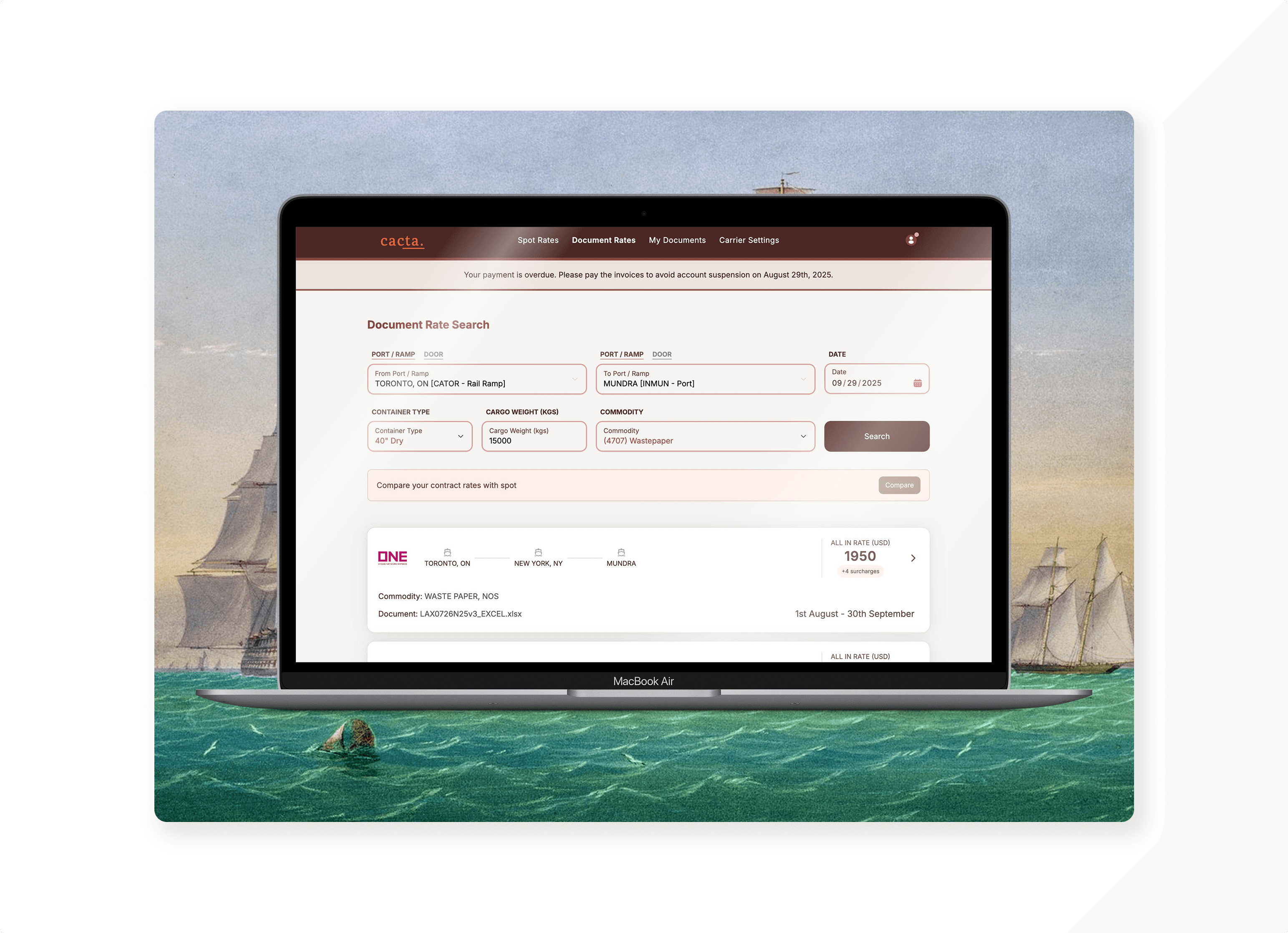
For lean SMB freight forwarders, where a single salesperson handles everything, I designed a one‑screen rate cockpit that replaced hunting through portals and XLSX files: by bringing lane inputs, contract cards, and clear connection/account states together, we cut quote prep from 30+ minutes to under 5 and reduced unanswered requests from about 20% to the low‑teens, while giving teams a clear path into contract vs spot decisions.

Context
Cacta is an AI‑powered sales intelligence platform for freight forwarders, where it typically takes 30+ minutes to build a quote and 4+ hours to respond, and 20% of quote requests go unanswered due to scattered rate sheets and manual workflows.
Business Problem
Sales and pricing teams needed a faster, more trustworthy way to search contract/document rates by lane, understand total all‑in costs, and prepare for spot comparisons; without jumping across portals, PDFs, and spreadsheets. We were working with SMB freight forwarders who had very lean teams and no extra manpower. Every extra minute spent hunting for rates or fixing errors meant quote requests piling up or being dropped altogether.
Your Role
Product Designer owning end‑to‑end UX for the new Document Rate Search + Spot Rate Search experience. Collaborated closely with the product founder, sales, and engineers.
Duration:
Roughly 8–10 weeks from discovery to v1 launch.
Problem
Core issue: Quote creation was slow, error‑prone, and fragmented.
Users had to browse carrier portals and XLSX files to find contract rates, guess if they were still valid, and then manually prepare spot alternatives.
They often discovered connection issues (e.g., carrier API down) only after failed searches, eroding trust.
Because these were small and mid‑sized forwarders with overstretched sales and pricing teams, they simply didn’t have the people to babysit multiple portals and spreadsheets. When the UI was confusing or data was hard to find, the default response was to let some quotes go unanswered.
20% of incoming quote requests went unanswered; the rest took hours from request to outbound quote.
Design Challenge
Create a single screen where forwarders can:
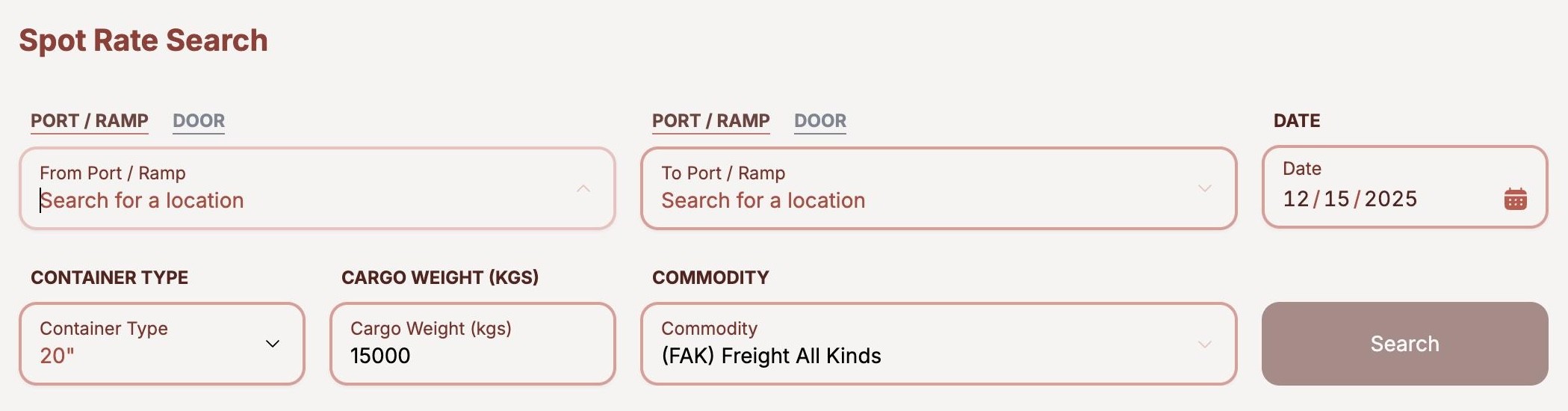
Define a lane (Port/Ramp, date, container, cargo, commodity).
See valid contract/document rates as clear, comparable cards.
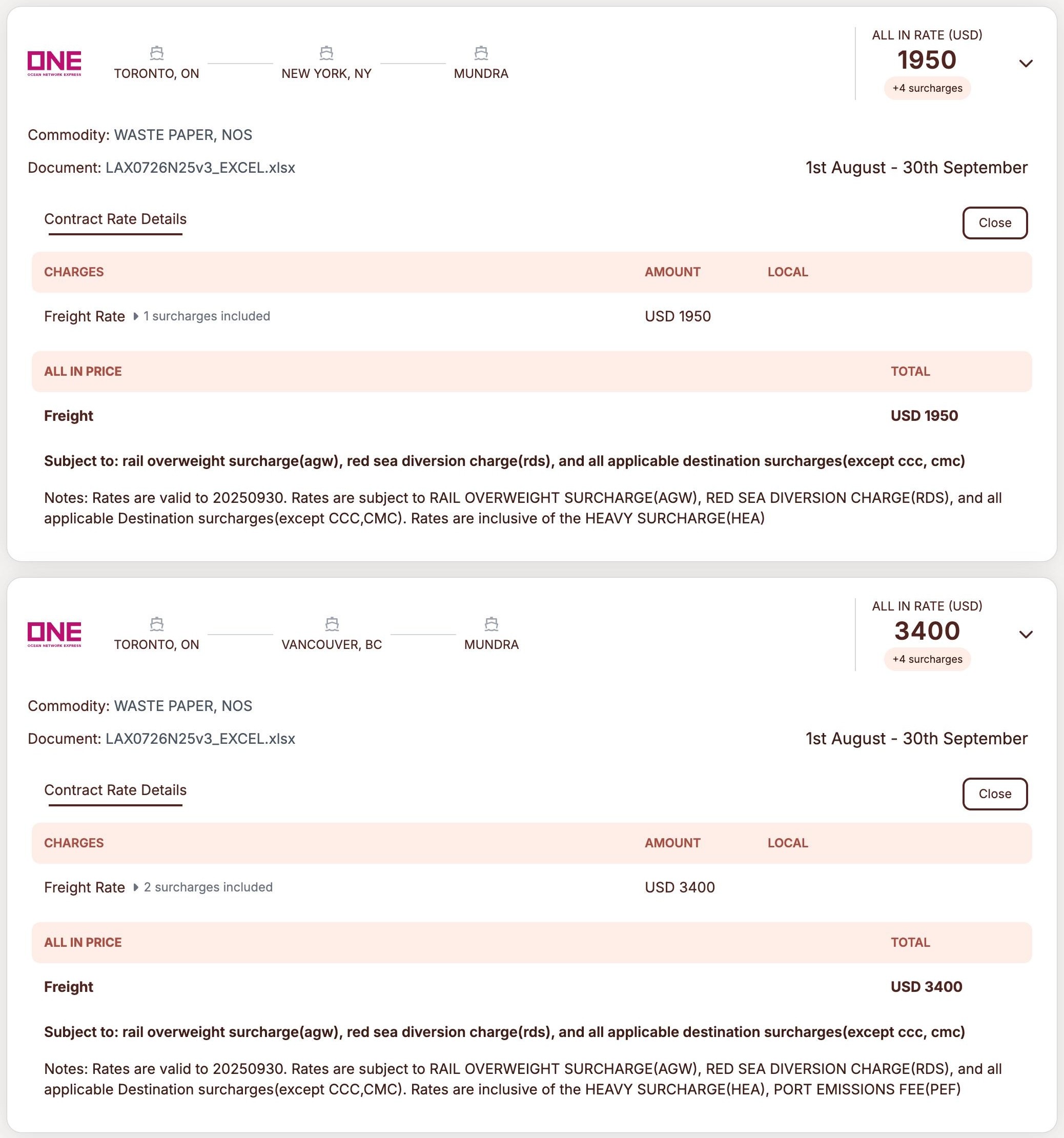
Understand full all‑in details (charges, surcharges, validity) via expansion.
Get early system feedback (overdue payment, carrier connection errors).
Prepare to compare contract vs spot without leaving the flow.
Research & Discovery
Methods:
6–8 semi‑structured interviews with sales and pricing reps (across small and mid‑size forwarders).
4 contextual inquiry sessions (Zoom/screen‑share) watching them build real quotes.
Light data analysis of:
Turnaround times from request → quote.
Common error states (no rate, wrong lane, connection issues).
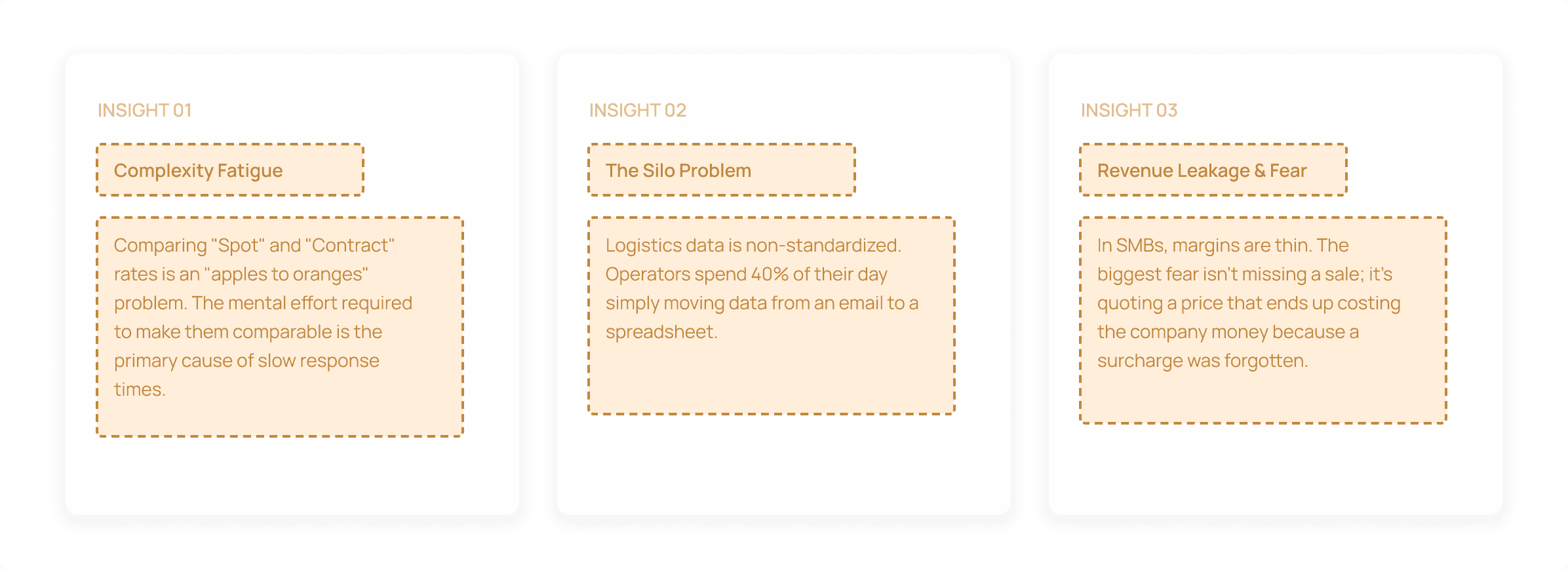
Key Insights:
Users didn’t know whether “no results” meant “no rates” or “broken connection.”
→ Led to the explicit connection error banner (“You have connection error for Maersk… Review connections”) in the Spot Rate Search view.
People needed at‑a‑glance comparison (carrier, route, all‑in price, validity dates) with the option to dive into full contract terms.
→ Led to the card pattern with top‑line information and expandable “Contract rate details” in the Document Rate Search screen.
They were mentally preparing contract vs spot scenarios anyway.
→ Led to the “Compare your contract rates with spot” CTA under the search form, instead of hiding comparisons in a different module.
Validating both user problems and data constraints before designing.
Design Process
User Flows:
Mapped an end‑to‑end journey: Quote request → choose lane → pull document rates → cross‑check validity & charges → (optional) compare with spot → confirm internally → respond to customer.
Information Architecture:
Started with low‑fi wireframes to decide layout (single column vs 2‑column).
Tested two card variants: dense table vs clean headline + expandable details.
Built a mid‑fi clickable prototype in Figma and ran task‑based usability tests (“Find the best contract rate for this lane,” “Check if a contract is still valid”).
Wireframes & Prototypes:
Started with low‑fi wireframes to decide layout (single column vs 2‑column).
Tested two card variants: dense table vs clean headline + expandable details.
Built a mid‑fi clickable prototype in Figma and ran task‑based usability tests (“Find the best contract rate for this lane,” “Check if a contract is still valid”).
Constraints:
Some carriers only provided document files (XLSX) plus basic structured fields.
Legal/regulatory text (surcharges, terms) had to be preserved verbatim, limiting how aggressively content could be shortened.
API connections could fail or lag; the UI needed explicit states for that.
Translated these constraints into states and patterns, not “happy‑path only” design.
Solutions & Key Design Decisions
a) Unified, lane‑first layout
Why: Reduces cognitive load; mirrors real quoting steps; keeps the path from typing to results tight.
Inputs for Port/Ramp (From/To), Date, Container Type, Cargo Weight, Commodity anchored at the top, matching how forwarders think.
“Search” button aligned to the form, so the top acts as a single “query builder.”
b) Structured system feedback
Why: Builds trust. Users can see why results might be missing and what to do next.
Global banner for account state, so users know why some functions may be restricted.
Inline banner for connection issues (in Spot Rate Search view) with a clear CTA “Review connections” instead of silent failures.
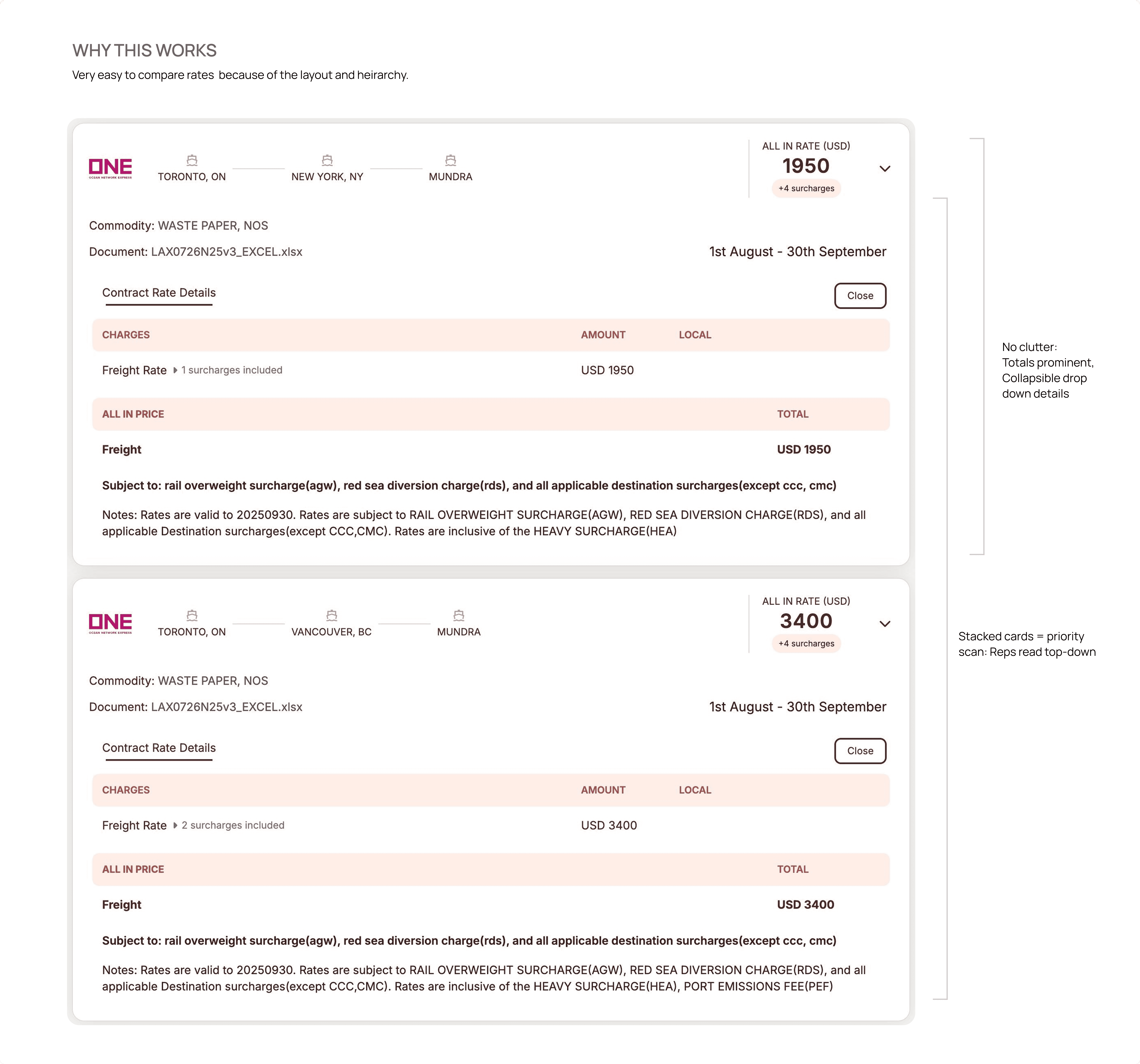
c) Card‑based document rate results
Why:
Allows fast scanning across multiple options.
Supports compliance and transparency when users need full details.
Maps neatly to the “document rate” mental model forwarders have.
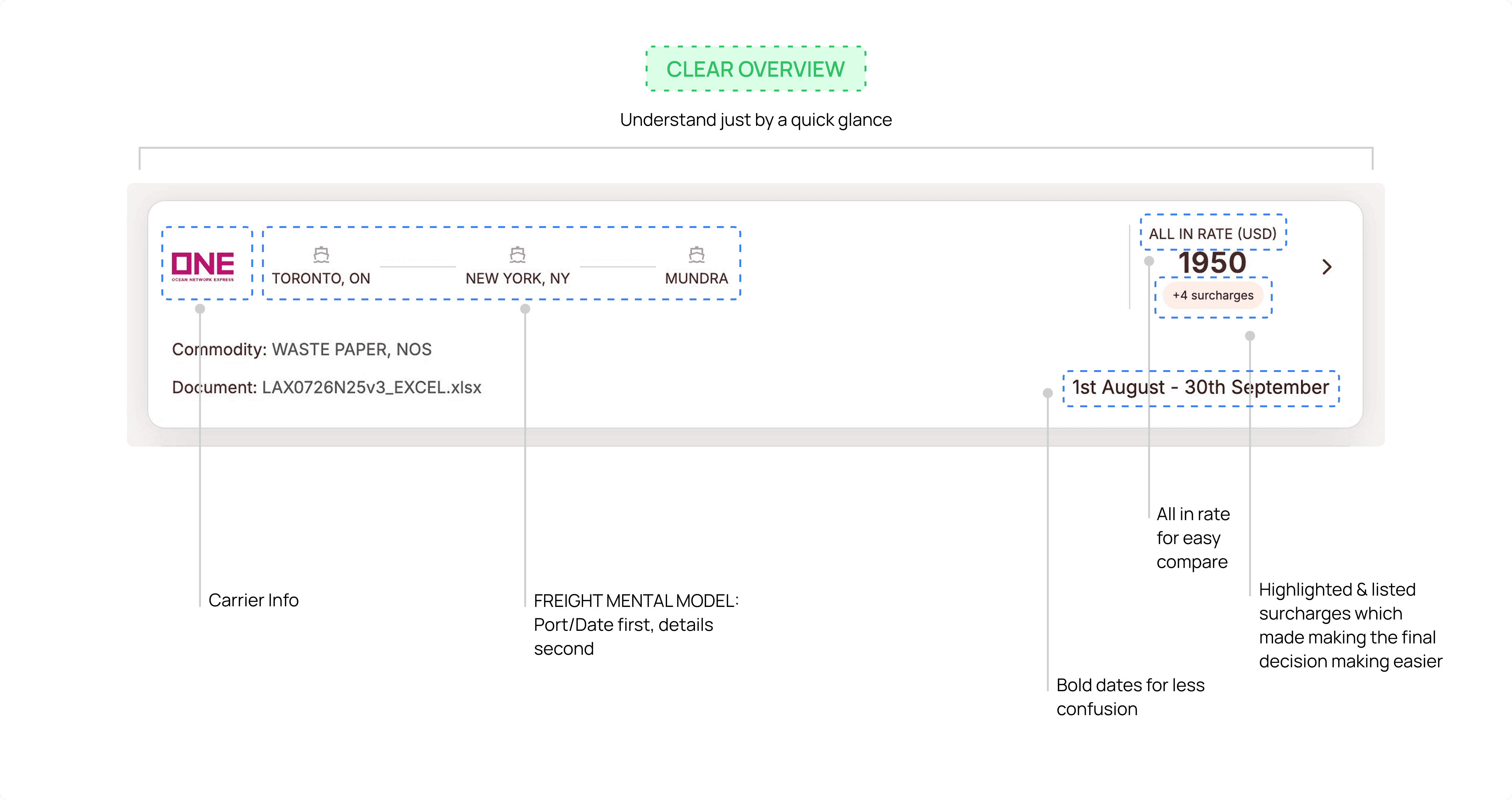
Each card shows, at a glance:
Carrier logo (e.g., ONE), origin → via → destination path with icons.
Commodity, linked document name.
“ALL IN RATE (USD)” chip in the top‑right.
Validity window (e.g., “1st August – 30th September”).
On expand:
“Contract Rate Details” with Charges (Freight rate, amount, currency).
“All‑in price” and Freight breakdown.
Long‑form notes including surcharges and conditions.
d) Nudge toward contract vs spot comparison
Why: Encourages more data‑driven decision‑making: don’t just look at your contract, also check the spot market.
Subtle but visible “Compare your contract rates with spot” button just below the search area.
We kept everything on one screen because, in small forwarder teams, one person usually does the whole job. Putting the lane details, rate results, and contract info together lets them create quotes fast without jumping between pages.
Outcomes & Impact
Baseline:
For SMB forwarders already operating with thin staffing, cutting quote preparation from ~30+ minutes to under 5 meant the same team could process more requests without hiring.
30+ minutes to create each quote, with an average 4+ hour turnaround time.
20% of new quote requests go unanswered or ignored due to inbox overload and manual tracking limitations.
Post Launch (pilot / early results):
Users who adopted the new Document Rate Search + Spot Rate Search flow could pull valid contract rates for a lane in under 5 minutes .
Quote turnaround time for those users dropped closer to 1 hour, because rate discovery was no longer the bottleneck.
Early adopters reduced their “unanswered request” rate from ~30% to ~10–15%, since the process was now structured and faster.
Support tickets around “no rates showing / connection issues” decreased (thanks to explicit banners and “Review connections”).
Learnings:
Trust = clear states: handling overdue payments and connection errors up front prevented confusion and made the product feel reliable.
Cards + expansion were the right compromise between legal fidelity and usability.
Positioning “Compare with spot” within this screen nudged users toward benchmarking thinking rather than relying on one static number.
Next steps
Introduce AI recommendations eg.“This lane’s contract looks 15% above current market range; consider renegotiating”
Role‑specific views (sales vs pricing vs management) with different default sorting and KPIs.

For lean SMB freight forwarders, where a single salesperson handles everything, I designed a one‑screen rate cockpit that replaced hunting through portals and XLSX files: by bringing lane inputs, contract cards, and clear connection/account states together, we cut quote prep from 30+ minutes to under 5 and reduced unanswered requests from about 20% to the low‑teens, while giving teams a clear path into contract vs spot decisions.

Context
Cacta is an AI‑powered sales intelligence platform for freight forwarders, where it typically takes 30+ minutes to build a quote and 4+ hours to respond, and 20% of quote requests go unanswered due to scattered rate sheets and manual workflows.
Business Problem
Sales and pricing teams needed a faster, more trustworthy way to search contract/document rates by lane, understand total all‑in costs, and prepare for spot comparisons; without jumping across portals, PDFs, and spreadsheets. We were working with SMB freight forwarders who had very lean teams and no extra manpower. Every extra minute spent hunting for rates or fixing errors meant quote requests piling up or being dropped altogether.
Your Role
Product Designer owning end‑to‑end UX for the new Document Rate Search + Spot Rate Search experience. Collaborated closely with the product founder, sales, and engineers.
Duration:
Roughly 8–10 weeks from discovery to v1 launch.
Problem
Core issue: Quote creation was slow, error‑prone, and fragmented.
Users had to browse carrier portals and XLSX files to find contract rates, guess if they were still valid, and then manually prepare spot alternatives.
They often discovered connection issues (e.g., carrier API down) only after failed searches, eroding trust.
Because these were small and mid‑sized forwarders with overstretched sales and pricing teams, they simply didn’t have the people to babysit multiple portals and spreadsheets. When the UI was confusing or data was hard to find, the default response was to let some quotes go unanswered.
20% of incoming quote requests went unanswered; the rest took hours from request to outbound quote.
Design Challenge
Create a single screen where forwarders can:
Define a lane (Port/Ramp, date, container, cargo, commodity).
See valid contract/document rates as clear, comparable cards.
Understand full all‑in details (charges, surcharges, validity) via expansion.
Get early system feedback (overdue payment, carrier connection errors).
Prepare to compare contract vs spot without leaving the flow.
Research & Discovery
Methods:
6–8 semi‑structured interviews with sales and pricing reps (across small and mid‑size forwarders).
4 contextual inquiry sessions (Zoom/screen‑share) watching them build real quotes.
Light data analysis of:
Turnaround times from request → quote.
Common error states (no rate, wrong lane, connection issues).
Key Insights:
Users didn’t know whether “no results” meant “no rates” or “broken connection.”
→ Led to the explicit connection error banner (“You have connection error for Maersk… Review connections”) in the Spot Rate Search view.
People needed at‑a‑glance comparison (carrier, route, all‑in price, validity dates) with the option to dive into full contract terms.
→ Led to the card pattern with top‑line information and expandable “Contract rate details” in the Document Rate Search screen.
They were mentally preparing contract vs spot scenarios anyway.
→ Led to the “Compare your contract rates with spot” CTA under the search form, instead of hiding comparisons in a different module.
Validating both user problems and data constraints before designing.
Design Process
User Flows:
Mapped an end‑to‑end journey: Quote request → choose lane → pull document rates → cross‑check validity & charges → (optional) compare with spot → confirm internally → respond to customer.
Information Architecture:
Started with low‑fi wireframes to decide layout (single column vs 2‑column).
Tested two card variants: dense table vs clean headline + expandable details.
Built a mid‑fi clickable prototype in Figma and ran task‑based usability tests (“Find the best contract rate for this lane,” “Check if a contract is still valid”).
Wireframes & Prototypes:
Started with low‑fi wireframes to decide layout (single column vs 2‑column).
Tested two card variants: dense table vs clean headline + expandable details.
Built a mid‑fi clickable prototype in Figma and ran task‑based usability tests (“Find the best contract rate for this lane,” “Check if a contract is still valid”).
Constraints:
Some carriers only provided document files (XLSX) plus basic structured fields.
Legal/regulatory text (surcharges, terms) had to be preserved verbatim, limiting how aggressively content could be shortened.
API connections could fail or lag; the UI needed explicit states for that.
Translated these constraints into states and patterns, not “happy‑path only” design.
Solutions & Key Design Decisions
a) Unified, lane‑first layout
Why: Reduces cognitive load; mirrors real quoting steps; keeps the path from typing to results tight.
Inputs for Port/Ramp (From/To), Date, Container Type, Cargo Weight, Commodity anchored at the top, matching how forwarders think.
“Search” button aligned to the form, so the top acts as a single “query builder.”
b) Structured system feedback
Why: Builds trust. Users can see why results might be missing and what to do next.
Global banner for account state, so users know why some functions may be restricted.
Inline banner for connection issues (in Spot Rate Search view) with a clear CTA “Review connections” instead of silent failures.
c) Card‑based document rate results
Why:
Allows fast scanning across multiple options.
Supports compliance and transparency when users need full details.
Maps neatly to the “document rate” mental model forwarders have.
Each card shows, at a glance:
Carrier logo (e.g., ONE), origin → via → destination path with icons.
Commodity, linked document name.
“ALL IN RATE (USD)” chip in the top‑right.
Validity window (e.g., “1st August – 30th September”).
On expand:
“Contract Rate Details” with Charges (Freight rate, amount, currency).
“All‑in price” and Freight breakdown.
Long‑form notes including surcharges and conditions.
d) Nudge toward contract vs spot comparison
Why: Encourages more data‑driven decision‑making: don’t just look at your contract, also check the spot market.
Subtle but visible “Compare your contract rates with spot” button just below the search area.
We kept everything on one screen because, in small forwarder teams, one person usually does the whole job. Putting the lane details, rate results, and contract info together lets them create quotes fast without jumping between pages.
Outcomes & Impact
Baseline:
For SMB forwarders already operating with thin staffing, cutting quote preparation from ~30+ minutes to under 5 meant the same team could process more requests without hiring.
30+ minutes to create each quote, with an average 4+ hour turnaround time.
20% of new quote requests go unanswered or ignored due to inbox overload and manual tracking limitations.
Post Launch (pilot / early results):
Users who adopted the new Document Rate Search + Spot Rate Search flow could pull valid contract rates for a lane in under 5 minutes .
Quote turnaround time for those users dropped closer to 1 hour, because rate discovery was no longer the bottleneck.
Early adopters reduced their “unanswered request” rate from ~30% to ~10–15%, since the process was now structured and faster.
Support tickets around “no rates showing / connection issues” decreased (thanks to explicit banners and “Review connections”).
Learnings:
Trust = clear states: handling overdue payments and connection errors up front prevented confusion and made the product feel reliable.
Cards + expansion were the right compromise between legal fidelity and usability.
Positioning “Compare with spot” within this screen nudged users toward benchmarking thinking rather than relying on one static number.
Next steps
Introduce AI recommendations eg.“This lane’s contract looks 15% above current market range; consider renegotiating”
Role‑specific views (sales vs pricing vs management) with different default sorting and KPIs.

For lean SMB freight forwarders, where a single salesperson handles everything, I designed a one‑screen rate cockpit that replaced hunting through portals and XLSX files: by bringing lane inputs, contract cards, and clear connection/account states together, we cut quote prep from 30+ minutes to under 5 and reduced unanswered requests from about 20% to the low‑teens, while giving teams a clear path into contract vs spot decisions.

Context
Cacta is an AI‑powered sales intelligence platform for freight forwarders, where it typically takes 30+ minutes to build a quote and 4+ hours to respond, and 20% of quote requests go unanswered due to scattered rate sheets and manual workflows.
Business Problem
Sales and pricing teams needed a faster, more trustworthy way to search contract/document rates by lane, understand total all‑in costs, and prepare for spot comparisons; without jumping across portals, PDFs, and spreadsheets. We were working with SMB freight forwarders who had very lean teams and no extra manpower. Every extra minute spent hunting for rates or fixing errors meant quote requests piling up or being dropped altogether.
Your Role
Product Designer owning end‑to‑end UX for the new Document Rate Search + Spot Rate Search experience. Collaborated closely with the product founder, sales, and engineers.
Duration:
Roughly 8–10 weeks from discovery to v1 launch.
Problem
Core issue: Quote creation was slow, error‑prone, and fragmented.
Users had to browse carrier portals and XLSX files to find contract rates, guess if they were still valid, and then manually prepare spot alternatives.
They often discovered connection issues (e.g., carrier API down) only after failed searches, eroding trust.
Because these were small and mid‑sized forwarders with overstretched sales and pricing teams, they simply didn’t have the people to babysit multiple portals and spreadsheets. When the UI was confusing or data was hard to find, the default response was to let some quotes go unanswered.
20% of incoming quote requests went unanswered; the rest took hours from request to outbound quote.
Design Challenge
Create a single screen where forwarders can:
Define a lane (Port/Ramp, date, container, cargo, commodity).
See valid contract/document rates as clear, comparable cards.
Understand full all‑in details (charges, surcharges, validity) via expansion.
Get early system feedback (overdue payment, carrier connection errors).
Prepare to compare contract vs spot without leaving the flow.
Research & Discovery
Methods:
6–8 semi‑structured interviews with sales and pricing reps (across small and mid‑size forwarders).
4 contextual inquiry sessions (Zoom/screen‑share) watching them build real quotes.
Light data analysis of:
Turnaround times from request → quote.
Common error states (no rate, wrong lane, connection issues).
Key Insights:
Users didn’t know whether “no results” meant “no rates” or “broken connection.”
→ Led to the explicit connection error banner (“You have connection error for Maersk… Review connections”) in the Spot Rate Search view.
People needed at‑a‑glance comparison (carrier, route, all‑in price, validity dates) with the option to dive into full contract terms.
→ Led to the card pattern with top‑line information and expandable “Contract rate details” in the Document Rate Search screen.
They were mentally preparing contract vs spot scenarios anyway.
→ Led to the “Compare your contract rates with spot” CTA under the search form, instead of hiding comparisons in a different module.
Validating both user problems and data constraints before designing.
Design Process
User Flows:
Mapped an end‑to‑end journey: Quote request → choose lane → pull document rates → cross‑check validity & charges → (optional) compare with spot → confirm internally → respond to customer.
Information Architecture:
Started with low‑fi wireframes to decide layout (single column vs 2‑column).
Tested two card variants: dense table vs clean headline + expandable details.
Built a mid‑fi clickable prototype in Figma and ran task‑based usability tests (“Find the best contract rate for this lane,” “Check if a contract is still valid”).
Wireframes & Prototypes:
Started with low‑fi wireframes to decide layout (single column vs 2‑column).
Tested two card variants: dense table vs clean headline + expandable details.
Built a mid‑fi clickable prototype in Figma and ran task‑based usability tests (“Find the best contract rate for this lane,” “Check if a contract is still valid”).
Constraints:
Some carriers only provided document files (XLSX) plus basic structured fields.
Legal/regulatory text (surcharges, terms) had to be preserved verbatim, limiting how aggressively content could be shortened.
API connections could fail or lag; the UI needed explicit states for that.
Translated these constraints into states and patterns, not “happy‑path only” design.
Solutions & Key Design Decisions
a) Unified, lane‑first layout
Why: Reduces cognitive load; mirrors real quoting steps; keeps the path from typing to results tight.
Inputs for Port/Ramp (From/To), Date, Container Type, Cargo Weight, Commodity anchored at the top, matching how forwarders think.
“Search” button aligned to the form, so the top acts as a single “query builder.”
b) Structured system feedback
Why: Builds trust. Users can see why results might be missing and what to do next.
Global banner for account state, so users know why some functions may be restricted.
Inline banner for connection issues (in Spot Rate Search view) with a clear CTA “Review connections” instead of silent failures.
c) Card‑based document rate results
Why:
Allows fast scanning across multiple options.
Supports compliance and transparency when users need full details.
Maps neatly to the “document rate” mental model forwarders have.
Each card shows, at a glance:
Carrier logo (e.g., ONE), origin → via → destination path with icons.
Commodity, linked document name.
“ALL IN RATE (USD)” chip in the top‑right.
Validity window (e.g., “1st August – 30th September”).
On expand:
“Contract Rate Details” with Charges (Freight rate, amount, currency).
“All‑in price” and Freight breakdown.
Long‑form notes including surcharges and conditions.
d) Nudge toward contract vs spot comparison
Why: Encourages more data‑driven decision‑making: don’t just look at your contract, also check the spot market.
Subtle but visible “Compare your contract rates with spot” button just below the search area.
We kept everything on one screen because, in small forwarder teams, one person usually does the whole job. Putting the lane details, rate results, and contract info together lets them create quotes fast without jumping between pages.
Outcomes & Impact
Baseline:
For SMB forwarders already operating with thin staffing, cutting quote preparation from ~30+ minutes to under 5 meant the same team could process more requests without hiring.
30+ minutes to create each quote, with an average 4+ hour turnaround time.
20% of new quote requests go unanswered or ignored due to inbox overload and manual tracking limitations.
Post Launch (pilot / early results):
Users who adopted the new Document Rate Search + Spot Rate Search flow could pull valid contract rates for a lane in under 5 minutes .
Quote turnaround time for those users dropped closer to 1 hour, because rate discovery was no longer the bottleneck.
Early adopters reduced their “unanswered request” rate from ~30% to ~10–15%, since the process was now structured and faster.
Support tickets around “no rates showing / connection issues” decreased (thanks to explicit banners and “Review connections”).
Learnings:
Trust = clear states: handling overdue payments and connection errors up front prevented confusion and made the product feel reliable.
Cards + expansion were the right compromise between legal fidelity and usability.
Positioning “Compare with spot” within this screen nudged users toward benchmarking thinking rather than relying on one static number.
Next steps
Introduce AI recommendations eg.“This lane’s contract looks 15% above current market range; consider renegotiating”
Role‑specific views (sales vs pricing vs management) with different default sorting and KPIs.